Adding Structures to Your Document: SMILES, PubChem Lookup and Captions
Preparing chemistry test papers and lecture notes becomes significantly faster when you can generate accurate two-dimensional molecular structures directly from plain typed text.
The Challenge of Adding Molecular Drawings to Chemistry Documents
Writing chemistry materials for Indian classrooms, coaching lectures, and university courses requires both symbolic equations and structural diagrams. Teachers drafting question sheets and students preparing project reports often struggle to insert chemical structures into word processors. Traditional drawing packages require dragging individual bonds, placing atomic symbols manually, and adjusting bond angles on a digital canvas. This workflow is slow, and moving diagrams into documents frequently produces misaligned lines, blurry low-resolution captures, or awkward page breaks.
The browser-based Chemistry Typing tool removes this barrier by combining immediate formula formatting with automated two-dimensional structure generation. Instead of switching between standalone vector illustration programs and text editors, you work in a single unified editor. As you enter chemical symbols, standard formulas format automatically, while molecular structures appear directly in your reading flow through text notations. This approach allows educators and scholars to assemble balanced reactions, mathematical expressions, and skeletal diagrams without sign-in barriers or software installations.
Understanding SMILES as Text-Based Molecular Descriptions
SMILES, which stands for Simplified Molecular Input Line Entry System, describes the atoms and bonds of a molecule as a concise, single line of text. In chemical informatics, representing molecular topology through text allows computers to store, parse, and render molecules without storing coordinate tables. In a SMILES string, non-hydrogen atoms are designated by their elemental abbreviations, such as carbon, oxygen, and nitrogen. Covalent single bonds between adjacent letters are implied, meaning two consecutive carbon symbols naturally represent an ethane skeleton.
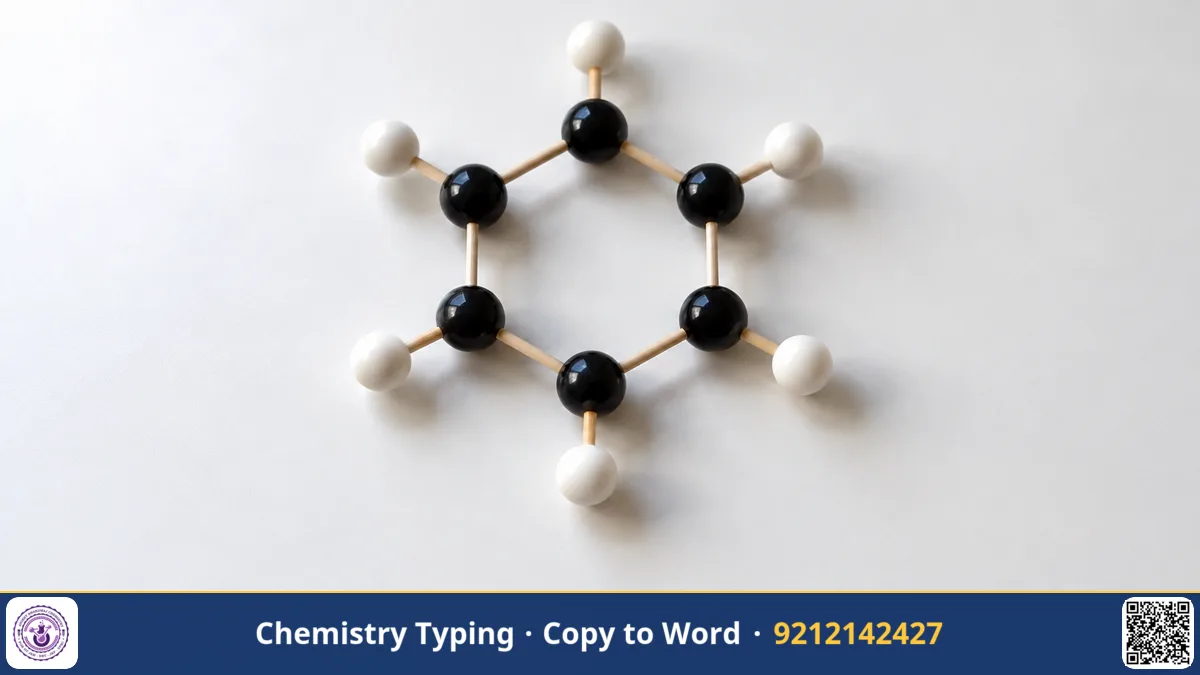
Branches are enclosed in standard parentheses, while double and triple bonds use specific characters such as an equals sign. Rings are formed by placing matching integer numbers next to the atoms that close the cyclic framework. For example, the six-membered aromatic ring of benzene is written as c1ccccc1, where lowercase letters denote aromatic atoms and the numeral one closes the cycle. Ethanol is represented simply as CCO, and acetic acid is written as CC(=O)O, reflecting the carbonyl oxygen branch. This system eliminates the ambiguity of manual sketches.
Five Familiar Molecules and Their Canonical SMILES Notations
To understand how line notations correspond to structural formulas taught across secondary and undergraduate curricula, examine five common organic compounds:
- Benzene (C6H6): c1ccccc1 — Six aromatic carbons joined in a conjugated cyclic ring.
- Ethanol (C2H5OH): CCO — A two-carbon aliphatic chain with a terminal hydroxyl group.
- Acetic acid (CH3COOH): CC(=O)O — A methyl group linked to a carbonyl carbon and a hydroxyl unit.
- Acetone (CH3COCH3): CC(=O)C — A carbonyl carbon bonded between two terminal methyl groups.
- Phenol (C6H5OH): Oc1ccccc1 — A hydroxyl oxygen attached directly to an aromatic benzene ring.
Each string contains all structural connectivity necessary to generate accurate skeletal formulas. Learning these basic sequences allows you to produce diagrams instantly without opening external databases.
Generating Captioned 2D Drawings with Double-Brace Syntax
The Chemistry Typing tool converts plain text commands into clean two-dimensional molecular illustrations using double braces. When you type a SMILES string inside braces, the engine parses the connectivity and draws the corresponding skeletal structure. Adding a vertical pipe followed by a text label adds a caption for the structure. For instance, entering {{c1ccccc1 | benzene}} renders the familiar aromatic hexagon with its ring system and labels it clearly as benzene.
Captions are particularly valuable when building question papers, laboratory manuals, and competitive exam practice sheets. You can label reactants, catalysts, or reaction products without hunting for separate text boxes in Word. The same document can also hold typed reactions with their conditions on the arrow, such as ->[heat] or ->[Pt, 500 K], so a worksheet can carry both its equations and its structure drawings.
Fetching Verified Compound Records via PubChem Lookup
You do not need to memorize SMILES strings to include molecular structures in your documents. If you know only the common or trade name of a substance, you can enclose the name in double braces, such as typing {{aspirin}}. Alternatively, you can use the Structures compound library located on the page by entering a substance name and clicking Look up. The tool queries PubChem, the comprehensive open chemical database maintained by the United States National Library of Medicine.
The PubChem lookup automatically returns several data fields for the requested substance:
- The systematic IUPAC name for standard chemical nomenclature.
- The chemical formula, such as C9H8O4 for acetylsalicylic acid.
- The calculated molar mass, useful for stoichiometry cross-checks with the periodic table.
- The canonical SMILES string and the corresponding two-dimensional structure drawing.
This automated retrieval eliminates manual data entry errors when compiling syllabus notes or analytical problems.
Exporting Formatted Notes to Word, Documents, and Unicode
Once you finish drafting equations and structural diagrams, moving your content into production files is straightforward. When you prepare an assignment sheet or a university tutorial, you can choose from several export buttons:
- Copy for Word: Copies formatted equations so that pasting with Ctrl+V into Microsoft Word maintains authentic subscripts, superscripts, and arrow symbols in fonts like Cambria, Calibri, Times New Roman, or Arial.
- Download .docx: Produces an editable Microsoft Word document where chemical structure drawings are embedded directly as standalone picture objects.
- Download .html: Saves the full document layout as a lightweight web file for online distribution or institutional portals.
- Copy as Unicode text: Generates plain text containing Unicode small digits for formulas like H2SO4, ideal for messaging apps and mobile emails.
- Print / PDF: Renders a clean print preview suitable for printing physical test papers or exporting crisp PDF documents.
- Save draft: Stores your work locally within your browser using chips, ensuring data privacy without server uploads.
Verification Habits and Proper Attribution in Chemistry Writing
While automated database retrieval and line notations save considerable time, rigorous verification remains essential in scientific communication. Automated database lookups can occasionally return unexpected molecular forms, such as specific counterion salts, alternate stereoisomers, or unusual tautomers if a generic name has multiple interpretations. Always inspect the generated two-dimensional drawing carefully before finalizing your lesson notes or examination papers to confirm that double bonds, ring substituents, and formal charges match your instructional objectives.
Furthermore, academic integrity requires proper attribution when compiling formal work, such as university dissertations, laboratory manuals, and published study guides. Because the compound library retrieves structural details and molecular properties directly from PubChem, you should acknowledge the US National Library of Medicine as your reference source in formal bibliographies. Combining meticulous visual review with reliable bibliographic attribution ensures that your educational materials remain authoritative, transparent, and pedagogically sound.
Key takeaways
- SMILES describes a molecule's atoms and bonds as a compact single line of text.
- Enclosing a SMILES string and label in double braces produces a clean two-dimensional drawing with a centered caption.
- Typing a compound name or using the compound library looks up the formula, molar mass and drawing from PubChem.
- Download .docx embeds structure drawings as pictures inside an editable Word file.
Frequently asked questions
What is a SMILES string in chemistry?
A SMILES string is a concise line of plain text that describes the covalent connectivity and arrangement of atoms within a molecule. It allows software to reconstruct and draw full two-dimensional chemical structures without needing manual sketch pads.
How does the tool find a compound from its name?
When you enter a name inside double braces or use the compound library, the tool looks it up in PubChem, the open database of the US National Library of Medicine. It returns the IUPAC name, formula, molar mass, SMILES and a 2D drawing.
Do the structures reach Microsoft Word?
Yes. Drawings go into Word and into the downloaded .docx file as pictures, next to your typed equations. Check the layout once in Word before you print or share the file.
Why should you visually verify molecular structures retrieved from databases?
Database searches can occasionally yield alternative tautomers, related salts, or differing stereochemical representations for common names. Checking the rendered graphic ensures the drawing precisely matches the specific reaction mechanism, functional group arrangement, or isomer taught in your curriculum.
Open Chemistry Typing. Type plain text, see it formatted at once, then copy it to Word or download a .docx. Free, no sign-in.
Open Chemistry Typing →